
Choosing the best PDF editor for small business teams: Pricing and feature comparison

The best PDF editor for small business buyers in 2026 is the one that reduces app-switching across editing, signatures, team coordination, and document visibility. In this guide, we compare DocHub, Adobe Acrobat, Foxit PDF Editor+, Smallpdf, and Nitro PDF based on what matters most to operations teams, office managers, legal and admin staff, HR leaders, finance teams, and real estate businesses.
- DocHub is a powerful, all-in-one solution for small business teams looking to manage PDF editing, eSignatures, storage, and workflow coordination from a single platform.
- Adobe Acrobat remains the most feature-rich alternative, with advanced editing, admin controls, and integrations. However, it is also the most expensive option for teams in the 5–25-user range.
- Smallpdf works well for lighter, browser-based use and offers an accessible entry point for smaller teams.
- Foxit and Nitro are solid alternatives to Adobe Acrobat, especially for teams focused on PDF editing and cost efficiency. Their capabilities are strong, though workflows like signing and collaboration may involve separate or less integrated features.
What small business teams look for in a PDF editor
In 2026, the demand for online PDF editors shifts towards comprehensive solutions with the following essential features:
Editing and conversion
A good PDF editor for business should, at a minimum, allow teams to edit text, add comments, manage text boxes, and rearrange pages. It also needs to handle core document management tasks like merging or splitting documents and converting files between common formats. Many users also require the ability to convert PDF files to Microsoft Word and vice versa, as well as export PDFs into other formats for easy sharing and archiving.
eSignatures and approval flows
A modern PDF editor should help teams sign PDFs, request digital signatures, and track who has signed what. For many small companies, the best PDF editor is one that combines PDF editing with signature workflows, so staff do not have to jump between a free PDF editor with limitations, a separate eSign app, and email during contract negotiations.
Team admin and permissions
Once you have 5 to 25 users, admin features matter. Look for seat management, centralized billing, user access controls, and visibility into who can work on which PDF files. While Adobe Acrobat and Nitro PDF offer robust administrative features, a growing number of alternative tools provide more lightweight governance options that are better suited for small to medium-sized businesses.
Storage and document organization
Teams also need secure storage, organized PDF documents, easy search, and a way to keep PDF files tied to the work around them. A business may start by storing contracts in Google Docs or a shared drive, but that often creates friction once multiple people need to edit PDFs, sign PDFs, and monitor status.
For more details about the safety of online PDF editors, please see our blog: Are online PDF editors safe?
Transparent pricing as team size grows
The pricing of a solution may become less beneficial as your team grows to 20 or 25 members. At DocHub, we provide favorable pricing for annual subscriptions. For larger teams, contact our sales department for a custom quote that may be more cost-effective than our standard per-seat pricing.
Quick comparison: the best PDF editors for small business teams
| Tool | Best for | Main consideration |
|---|---|---|
| DocHub | Teams that want editing + eSign + workflow in one place | Prices for organizational plans may be more attractive, so be sure to talk to the sales team before upgrading your organization to Pro |
| Adobe Acrobat | Teams with demand for the deepest PDF feature set and enterprise familiarity within Adobe infrastructure | Highest cost in this comparison |
| Foxit PDF Editor+ | Budget-conscious teams needing strong PDF editing | Workflow story is less unified |
| Smallpdf | Browser-first teams with light to moderate needs | Does not offer strong workflow-management features |
| Nitro PDF | Teams wanting an Adobe alternative with admin features | Fuller signing workflows may require Nitro Sign |
DocHub — strong value for editing, eSignatures, and team workflows
DocHub is a solid option in this comparison for small businesses. It brings together several everyday tasks: editing PDFs, collecting signatures, reusing forms and templates, and storing documents within one platform, which can help reduce reliance on multiple tools. Integrations with GSuite and Google Drive unify workflows for Google-native organizations. To enhance team collaboration, DocHub introduces Rooms, a distinctive feature that goes beyond simple file storage. Rooms serve as shared workspaces where teams can organize documents, manage access, and monitor activity in a centralized location. This feature streamlines your team’s workflow by structuring and increasing the visibility of document-related tasks like signing and reviewing, and streamlining task coordination.
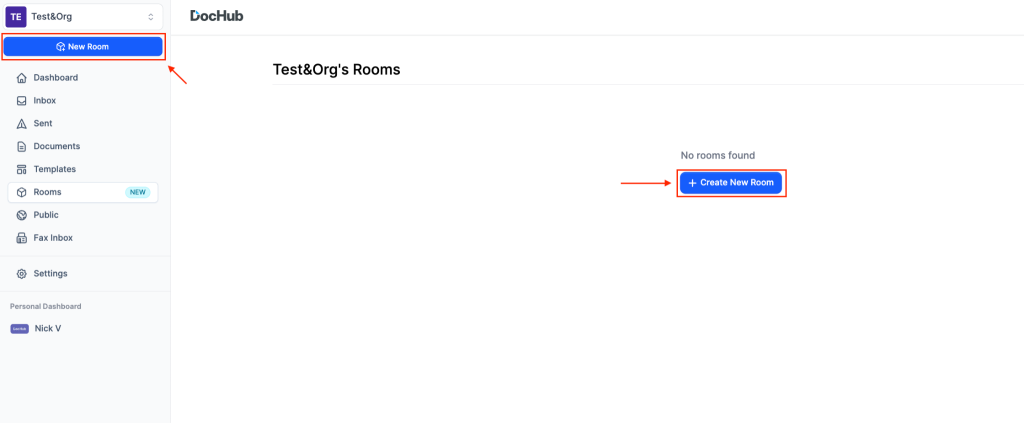
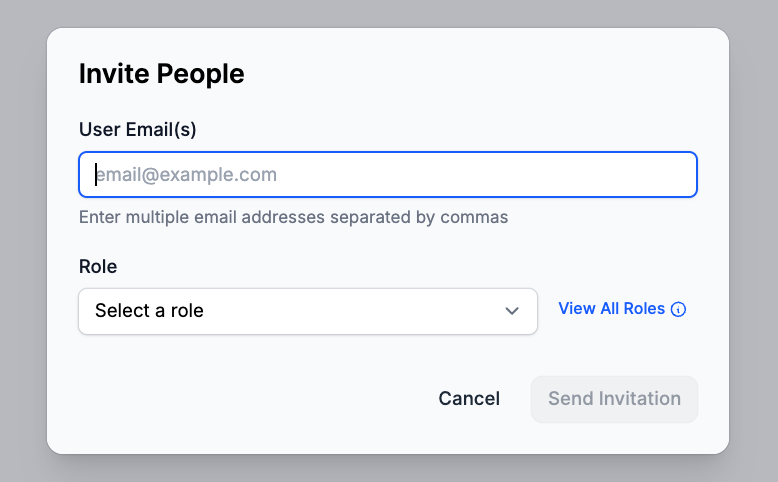
Rooms also provide additional document security: the only way to enter a room is via an invite that specifies the role.
By assigning roles, you can ensure only authorized individuals can access specific documents. Permissions to annotate or modify files are also role-based, and the activity history for each document is uneditable.
DocHub is well-suited for teams managing recurring document workflows, such as onboarding, approvals, and client paperwork. By centralizing documents, participants, and progress tracking, the platform simplifies daily coordination and streamlines operations.
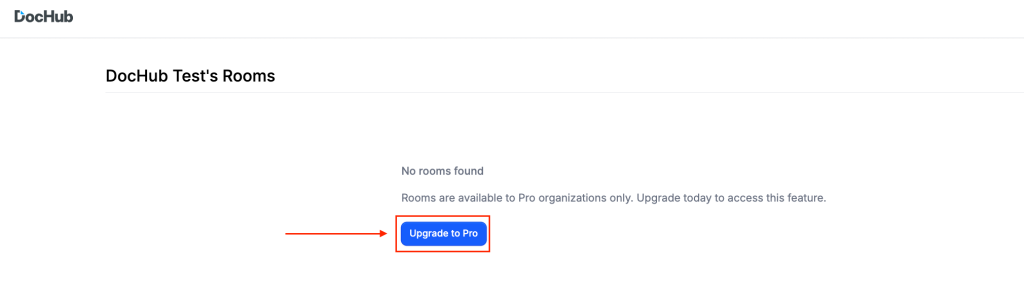
The pricing structure gives smaller teams an accessible starting point while allowing possibilities to scale. It is worth noting that Rooms are available only in Pro organization plans, so you’ll need to upgrade to Pro before creating a room.
For a detailed breakdown of pricing and a comparison with top alternatives, see the table below.
Adobe Acrobat — advanced editing and enterprise-grade capabilities
Adobe Acrobat is the gold standard among PDF solutions, known for advanced editing and established document workflows. Organizations often choose Acrobat Pro and Acrobat Pro for teams for its mature product ecosystem, strong PDF compatibility, and familiar interface.
The platform includes advanced features like PDF editing, OCR (optical character recognition), form creation, password protection, and eSignatures. It also integrates with tools such as Microsoft 365 and SharePoint, and provides admin features for managing users and permissions.
For larger organizations, Acrobat offers structured controls and deployment options that fit existing enterprise environments. Since many users are already familiar with Adobe Reader, onboarding can be easier.
The main downside is cost and complexity. Business pricing starts at $22.19 per user per month, making Acrobat Pro for teams a more expensive option. Some teams may also find the full feature set excessive for everyday tasks like basic editing, signing, and sharing.
Foxit — the affordable desktop-centric alternative
Foxit PDF Editor is a popular Adobe alternative for users who prefer desktop PDF software. For small businesses, the Foxit PDF Editor+ plan is the most suitable option, as it offers more business-friendly features beyond the core PDF editing tools.
Foxit PDF Editor+ is ideal for teams needing strong editing, OCR, and security features without paying Adobe prices. Compared to Adobe Acrobat Pro, Foxit is more affordable yet still offers advanced features such as optical character recognition, form fields, file annotation, and in-depth text editing.
The Editor+ plan also adds cloud storage, smart redaction, and eSignatures, which boosts its business appeal. For teams focused on document editing and security, Foxit is a sensible middle ground between a basic free editor and a premium enterprise suite.
The main limitation is that Foxit’s workflow is less unified than DocHub’s. It remains primarily a PDF editor, not a comprehensive document workflow hub. This works well for businesses with editing-heavy needs, particularly those that want robust features in a traditional software environment.
Smallpdf — best lightweight online option
Smallpdf is one of the most accessible online PDF editors on the market. It is browser-first, easy to understand, and a good fit for smaller teams that want a lightweight way to edit PDF files, convert PDFs, compress files, and sign PDFs without a heavier desktop app.
In the search results for “PDF editor 2026” or “best free PDF editor 2026”, Smallpdf will show up quickly because it makes basic tools approachable. The free version is useful for light needs, and the paid team offering adds discounted pricing, priority support, centralized billing, member access management, and unlimited Sign.com Premium signing features for each member.
The main limitation is scale and workflow depth. Smallpdf can be one of the best free PDF editors or best free PDF editors for small businesses to start with, but its pricing and packaging become less transparent as team size grows. It also does not offer as strong a workflow-management story as DocHub Rooms.
Nitro — best for teams that want an Adobe alternative with admin support
Nitro PDF is a solid Adobe alternative for businesses that want good editing depth, admin controls, and team support without paying top-tier Adobe Acrobat pricing. Nitro PDF Standard is the most realistic comparison point for SMBs because it is positioned for individuals, teams, and businesses and includes AI tools, OCR, the Nitro Admin portal, and 24/7/365 support for 2+ licenses.
For teams that need dependable PDF editing, strong support, and centralized oversight, Nitro PDF can be a practical choice. It offers a balance between affordability and capability, especially for companies that want more control than a lightweight free PDF editor provides.
Nitro also appeals to Windows users in particular, though Mac users may compare it against alternatives like PDF Expert, depending on device mix and workflow preferences. In broader “best PDF editor” conversations, Nitro PDF often sits in the middle: more admin-ready than lightweight online PDF editors, but less entrenched than Adobe Acrobat Pro.
The tradeoff is that Nitro’s fuller signature workflows live more heavily in Nitro Sign plans. So while Nitro PDF is strong as PDF software, some businesses evaluating edit-and-sign workflows may find the product split less streamlined than tools that combine editing and signatures more tightly. Nitro also directs buyers with more than 20 licenses to sales, which adds quote friction as the team grows.
Pricing comparison for 5, 10, and 25 users
We compared the annual billing options for each pricing plan to ensure the best value. Monthly billing rates may be higher, so please check the respective pricing pages for the most current information.
PDF editor pricing for small business teams: 5, 10, and 25 users
| Product | Best-fit plan for comparison | 5 users | 10 users | 25 users | Notes |
|---|---|---|---|---|---|
| DocHub | Pro: $12/user/mo | $60/mo | $120/mo | $300/mo | To get beneficial special offers for large organizations, contact our sales team |
| Adobe Acrobat | Acrobat Pro for teams: $23.99/mo per license | $119.95/mo | $239.90/mo | $599.75/mo | Custom offers for large teams are available |
| Foxit | PDF Editor+: $13.99/user/mo | $69.95/mo | $139.90/mo | $349.75/mo | Based on indexed 2026 pricing, Editor+ is the more relevant team tier |
| Smallpdf | Teams | $35/mo | $70/mo | Custom quote | Discounts are available when billing yearly |
| Nitro | Nitro PDF Standard | $90/mo | $180/mo | $375/mo | Nitro PDF Plus offers volume discounts for large teams |
| Product | Best-fit plan for comparison | 5 users | 10 users | 25 users | Notes |
| DocHub | Pro:$12/user/mo | $60/mo | $120/mo | $300/mo | To get beneficial special offers for large organizations, contact our sales team |
| Adobe Acrobat | Acrobat Pro for teams$23.99/mo per license | $119.95/mo | $239.90/mo | $599.75/mo | Custom offers for large teams are available |
| Foxit | PDF Editor+ | $69.95/mo | $139.90/mo | $349.75/mo | Based on indexed 2026 pricing, Editor+ is the more relevant team tier |
| Smallpdf | Teams | $35/mo | $70/mo | Custom quote | Discounts are available when billing yearly |
| Nitro | Nitro PDF Standard | $90/mo | $180/mo | $375/mo | Nitro PDF Plus offers volume discounts for large teams |
Which PDF editor is best for your team size?
1–4 users
When simplicity and cost are the top priorities, Smallpdf can be a practical option for lightweight, browser-based editing and signing. A free PDF editor may also work for basic tasks, although most free versions come with limits on usage, features, or file size.
DocHub Pro is a solid option if even a small team wants more consistency in how documents are handled.
5–10 users
Smallpdf can still be appealing from a cost perspective. Foxit PDF Editor+ and Nitro PDF offer more advanced editing capabilities, especially for teams that prefer a desktop-style experience and work extensively with PDFs.
DocHub offers a balanced approach in this range, combining editing, signing, and document organization in one place. Adobe Acrobat Pro is also a viable option, particularly for teams that need advanced features or are already familiar with Adobe’s ecosystem, though it comes at a higher price point.
10–25 users
As teams grow, document workflows and internal coordination become more important. Pricing may also shift toward custom plans with tools like Smallpdf and Nitro. Foxit remains relatively cost-effective for editing, though workflow features may require additional setup or tools.
Adobe Acrobat provides strong administrative controls and integrations, but the total cost can increase significantly at this level. DocHub can be a good fit for teams looking to centralize document tasks and balance cost-effectiveness.
Regulated or operations-heavy teams
Adobe Acrobat is strong when deep compliance-oriented features and enterprise-style tooling are required. DocHub excels at balancing editing, eSignatures, storage, visibility, and workflow coordination in an intuitive interface.
Disclaimer: The information contained in this blog post is provided for general informational purposes only and does not constitute formal legal advice.
Final verdict
The best PDF editor depends on your priorities: Adobe Acrobat for advanced, enterprise-grade features, Smallpdf for lightweight browser-based use, and Foxit or Nitro for cost-effective desktop editing.
If your team wants to simplify everyday document work, DocHub offers a practical, all-in-one approach without unnecessary complexity.
Get started with DocHub for free and see how much easier it is to manage your documents in a single workflow.
FAQ
What is the best PDF editor for a small business?
The best option depends on your workflow. If you need advanced editing and enterprise controls, Adobe Acrobat is a strong choice. If your focus is on everyday document tasks – editing, signing, and organizing files – tools like DocHub provide a more streamlined, all-in-one approach.
What is the best free PDF editor for small business teams?
Free tools can work for occasional use, such as viewing, commenting, or basic edits. However, most teams quickly outgrow them due to limits on features, file size, or usage. Paid tools are typically needed for signatures, admin controls, and ongoing team workflows.
Which PDF editor includes eSignatures?
Most modern PDF editors, including DocHub, Adobe Acrobat, Foxit, Smallpdf, and Nitro, offer eSignature functionality. The main difference is how closely signing is integrated with editing, storage, and team workflows.
What should small businesses prioritize when choosing a PDF editor?
Look for a tool that matches your daily work: editing, signing, document storage, and basic team coordination. For growing teams, it’s also important to consider pricing transparency, admin controls, and how well the tool reduces the need for multiple apps.
- What small business teams look for in a PDF editor
- Quick comparison: the best PDF editors for small business teams
- DocHub — strong value for editing, eSignatures, and team workflows
- Adobe Acrobat — advanced editing and enterprise-grade capabilities
- Foxit — the affordable desktop-centric alternative
- Smallpdf — best lightweight online option
- Nitro — best for teams that want an Adobe alternative with admin support
- Pricing comparison for 5, 10, and 25 users
- Which PDF editor is best for your team size?
- Final verdict
- FAQ