


With the increasing reliance on online tools, safeguarding data privacy has become a top priority for individuals and businesses alike. Understanding how online editors handle your data is essential to ensure your sensitive information remains secure.
- Data privacy in online editors is a critical concern in 2026 due to increased use of cloud-based tools.
- Users should prioritize platforms with strong encryption and transparent privacy policies.
- Be cautious about sharing sensitive data on platforms without clear data ownership terms.
- Opt for tools that comply with global data protection regulations like GDPR or CCPA.
- Regularly review and update privacy settings to enhance data security.
Online PDF editors have become essential tools for professionals who need to edit, sign, and share PDF documents quickly. Their convenience, however, introduces important questions about data privacy. When you upload a file to a browser-based service, you are trusting that vendor to handle your information securely. As digital workflows become more integrated, understanding how online editors handle data is no longer just a technical detail—it’s a core business requirement.
The risks are tangible. According to IBM’s Cost of a Data Breach Report 2025, the average cost of a data breach in the U.S. surged to a record high of $10.22 million. This guide provides a clear roadmap to online PDF editor data privacy. We will explain how these tools work, where risks hide, and what secure PDF editing practices you can implement to protect your sensitive documents.
How online editors handle your data
To understand data privacy, you must first understand the lifecycle of a document within an online PDF editor. The process is more complex than simply opening a file. Each stage presents unique security considerations.
- Ingestion: You start by uploading a document from your device or importing it from a cloud storage service like Google Drive or Dropbox. At this point, the file is transferred over the internet to the editor’s servers. A key question is whether this transfer uses strong data encryption to protect PDF files from interception.
- Processing: Once uploaded, the editor renders the PDF form so you can interact with it. When you edit text, add images, or use editing tools like optical character recognition (OCR), the software creates temporary working files and logs your changes. If you use a redaction tool, it is crucial that it permanently removes sensitive content.
- Storage: After you edit, the document might be stored on the vendor’s servers. Retention policies vary significantly. Some services delete files after a short period, while others store documents until you manually delete them. Understanding these policies is vital for document operations and compliance.
- Sharing: Sharing PDF pages via a link or email invitation is a common source of data exposure. Secure online tools offer options to control access, such as PDF password protection, authenticated sharing for authorized users only, and setting link expiration dates. Without these controls, a sensitive document can easily fall into the wrong hands.
- Logging: Beyond the file itself, online PDF editors generate metadata. This can include file names, IP addresses, timestamps, and activity logs detailing who accessed a document and when. This “shadow data” can be just as sensitive as the PDF document’s content.
Secure PDF editing practices: a step-by-step playbook
Adopting a set of secure PDF editing practices is the most effective way to protect your information. This playbook provides a repeatable standard for handling PDF files online.
1. Classify documents before uploading
Not all PDF documents carry the same level of risk. Before you upload a file to a free online PDF editor, classify its sensitivity. A simple three-tier system works well:
- Public: Information that can be shared broadly.
- Internal: Business-sensitive data that requires authenticated sharing.
- Restricted: Documents containing personal data, financial details, or contracts. Treat these with the utmost care.
2. Choose an editor with verifiable security controls
Look for a PDF editor that transparently communicates its security measures. Essential features include:
- Data encryption: The service should use strong encryption, like AES-256, for data both in transit (during upload and download) and at rest (while stored on servers).
- Access controls: The vendor should enforce strict internal access controls, ensuring only necessary personnel can access user data.
- Independent audits: Certifications like SOC 2 Type II provide independent assurance that a vendor has established and follows strict information security policies. DocHub, for example, provides details on its SOC 2 compliance and security posture.
3. Set intentional retention and deletion rules
Your organization needs clear rules for how long to keep documents. Decide whether you will store documents in the editor or use a “process-and-download” approach. For restricted documents, a strong deletion process is critical. Some platforms, including DocHub, state that deleted documents are not recoverable, which is an important feature for enforcing data retention policies.
4. Lock down your sharing defaults
Sharing is often the weakest link in data security. To mitigate this risk, standardize your sharing practices:
- Use authenticated sharing for all internal and restricted documents.
- Set expiration dates on links whenever possible.
- Disable “anyone with the link can view” permissions for sensitive content.
- Use tools with audit logs to track who has accessed your documents.
5. Harden your user accounts
Attackers often target user accounts, not the platform’s infrastructure. Enforce strong account security across your team:
- Require a strong password for every account.
- Enable multi-factor authentication (MFA) wherever available.
- Use single sign-on (SSO) for team accounts to centralize access management.
- Limit administrative roles to only those who absolutely need them.
Comparing online PDF editors for security and compliance
When selecting an online PDF editor, organizations should evaluate encryption practices, third-party security audits, and regulatory alignment. Security capabilities vary by vendor and subscription plan.
Adobe Acrobat (Adobe Document Cloud)
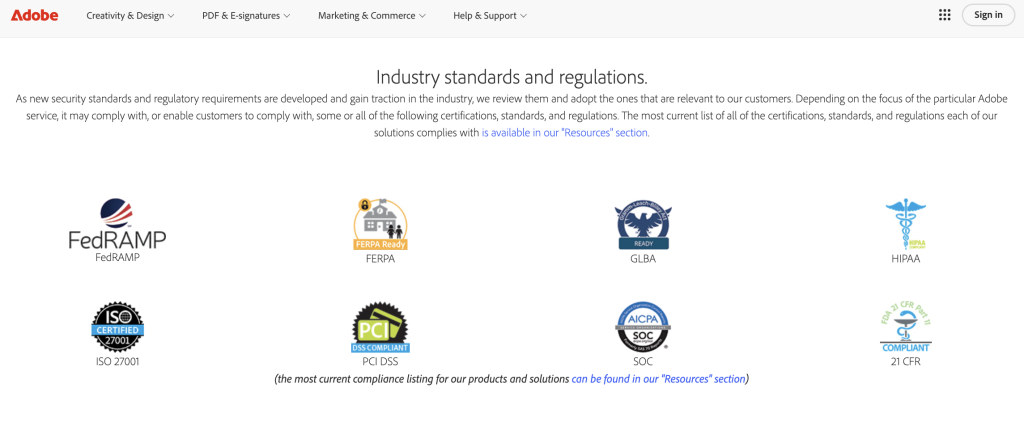
Adobe provides published security documentation for its cloud services. Reported measures include:
- AES-256 encryption for data
- SOC 2 Type II attestation
- ISO/IEC 27001 certification
- HIPAA compliance support
- PCI DSS certification
- Regular vulnerability scanning and penetration testing
- Documentation supporting GDPR compliance
Availability of specific certifications may depend on the service and plan used.
iLovePDF
iLovePDF’s privacy policy clearly outlines their dedication to maintaining the confidentiality and security of user data:
- AES 256-bit encryption for data security
- ISO/IEC 27001:2017 certification
- GDPR compliance for user privacy and data protection
- Secure SSL connections to safeguard all file transfers
- Integrates services provided by Qualified Trust Service Providers (QTSP) under eIDAS

DocHub
DocHub is a cloud-based PDF editing and e-signature platform. Vendor documentation references:
- AES 256-bit encryption for stored data
- SOC 2 Type II attestation
- Support for GDPR compliance through data processing agreements
- Defined data retention policies
- HIPAA compliance support
- PCI DSS certification for secure credit and debit card transactions
- CPRA compliance for the privacy rights of California residents

As with any provider, organizations should review current trust center materials and contractual documentation to confirm applicable certifications and compliance coverage.
File retention practices differ among vendors. Some browser-based tools automatically delete uploaded files after a short time frame, while others retain documents until users take action. Organizations should review each provider’s security documentation, retention policies, and compliance statements to ensure alignment with internal governance and regulatory requirements.
What to look for in a GDPR compliant PDF editor
For businesses operating in or serving the European Union, compliance with the General Data Protection Regulation (GDPR) is non-negotiable. A “GDPR compliant PDF editor” isn’t just a marketing slogan; it refers to a tool that enables you to meet your own compliance obligations.
When you use an online PDF editor for customer or employee data, you are the “data controller,” and the vendor is the “data processor.” You are responsible for ensuring the processor handles data according to GDPR rules. Here is what to verify:
- Data Processing Agreement (DPA): The vendor should offer a DPA that outlines their responsibilities as a processor.
- Data minimization and deletion: The service should allow you to manage your data and provide a clear process for permanent deletion.
- Sub-processor transparency: The vendor must be transparent about any third-party services (sub-processors) they use to handle your data.
- Security attestations: Look for evidence of security controls, such as a SOC 2 report, which demonstrates the vendor’s commitment to protecting data.
Disclaimer: The information contained in this blog post is provided for general informational purposes only and does not constitute formal legal advice.
Final thoughts
The convenience of online PDF editors does not have to come at the expense of data privacy. By understanding how these tools handle data and implementing secure PDF editing practices, you can protect your sensitive information while maintaining workflow efficiency.
In 2026, a proactive approach to data security is essential. Standardize your document workflows by classifying data, choosing vendors with verifiable security controls, and enforcing strict sharing and retention policies. Tools like DocHub, with their focus on encryption, compliance certifications, and user-controlled document management, offer a reliable foundation for building a secure, modern workflow. Take the first step toward secure document management—try DocHub today and edit PDF documents online with confidence, knowing your confidential information remains protected.
Glossary
- Data Encryption: The process of converting data into a code to prevent unauthorized access. AES-256 is a common and highly secure encryption standard.
- GDPR (General Data Protection Regulation): A regulation in EU law on data protection and privacy for all individuals within the European Union and the European Economic Area.
- SOC 2 Type II: An auditing procedure that ensures a service provider securely manages your data to protect the interests of your organization and the privacy of its clients. It is a report on the effectiveness of a vendor’s security controls over a period of time.
- Multi-Factor Authentication (MFA): A security process that requires users to provide two or more verification factors to gain access to a resource, such as a password and a code sent to their phone.
FAQ
1. How do online editors handle data if I just edit and download?
Most online tools temporarily upload your file to their servers for processing. Even if you don’t save the file, it resides on the vendor’s system for a period. Secure services encrypt the file during this process and have clear policies for how long temporary files are stored before deletion.
2. What is the safest way to edit PDFs online if the file contains PII?
First, minimize the data by redacting any information not needed for the task. Use an online PDF editor with strong, verifiable security, such as 256-bit encryption and SOC 2 compliance. Always use authenticated sharing and destroy drafts as soon as the workflow is complete.
3. What should I look for in a GDPR compliant PDF editor?
Look beyond marketing claims. Verify the vendor offers a Data Processing Agreement (DPA), provides clear information on data retention and deletion, is transparent about sub-processors, and can supply evidence of its security controls, such as a SOC 2 report.
4. How does DocHub fit into a privacy-first workflow?
DocHub supports a privacy-first approach by offering end-to-end encryption, SOC 2 Type II compliance positioning, and granular user controls. Its documented data retention and irreversible deletion processes help teams operationalize their data governance policies. Its integrations with platforms like Google Workspace also reduce the need to create extra copies of documents.
5. Are digital signatures from online editors legally binding?
Yes, signatures created with compliant online tools are legally binding in many jurisdictions. For instance, in the U.S., the ESIGN Act grants legal recognition to electronic signatures. A digital signature from a platform like DocHub is also verifiable and tamper-evident, as it is uniquely linked to the signer and the document.