


While PDF editing is essential for businesses of all sizes, users still rely on both online and offline software solutions. Each approach offers distinct advantages, so there is no universal answer to the question, “Which type of software should I use?” Instead, it’s helpful to compare their features and practical differences to understand where the benefits of online tools are most apparent and where offline software may be more appropriate.
- Online tools are best for teams, remote work, and quick edits, because they work on any device and often include cloud storage integration.
- Offline solutions may be useful if you work without an internet connection or handle massive files that might slow down a browser.
- Cost matters: Online editors offer flexible subscription models and generous free plans, while desktop licenses may cost you more.
- DocHub bridges the gap by offering powerful editing, signing, and sharing features directly in your browser.
Whether you need to edit PDF files occasionally or manage hundreds of documents a week, this guide helps you get a clear view. We will compare the benefits of online PDF editing against the traditional desktop approach, so you can make an informed choice.
What are the fundamental differences in PDF editing software?
Let’s get back to defining the types of software we are talking about.
- Offline PDF Software: This is a program you download and install on your computer’s hard drive. It uses your computer’s processing power to run.
- Online PDF Tools: These are web-based applications accessible directly through your browser. Hosted in the cloud, they eliminate the need for any installation on your device.
Why use offline PDF software?
Downloadable programs used to be the standard. While the world is moving to the cloud, there are specific scenarios where they can still be useful. So the question arises: “Why use offline PDF software?” Let’s dive deeper and answer it.
When offline might be necessary
- Unstable internet: If you work in a location with zero internet access, installed software is your only option.
- Massive file sizes: If you are editing large files (think 500+ MB engineering blueprints), a desktop app may handle rendering faster, depending on system resources
- Legacy systems: Some older operating systems may not efficiently support modern web browsers, forcing users to stick with older desktop apps.
However, for modern small businesses, these traditional tools often come with downsides. They take up space on your hard drive, require manual updates, and make collaboration difficult. You usually have to save a file, email it, wait for the other person to edit it, and email it back. That process is slow and time-consuming.
What are the major benefits of online PDF editing?
Business users prefer online tools because they match how we actually work. In remote and hybrid work environments, where days are spent between home offices and shared workspaces, we rely on a range of devices. Online PDF editing tools, available on laptops, tablets, and smartphones, let us stay connected and productive.
Key takeaways
- Access: Edit from anywhere with an internet connection.
- Collaboration: Multiple users can view or sign the same document.
- Cost: Usually more affordable with flexible subscriptions.
Here is why making the switch to an online PDF editor makes sense:
1. Convenience and accessibility
If we want to define the “best online PDF tool for convenience”, it is always there when you need it. With online platforms, your PDFs are stored in the cloud. You can easily access them from your phone while on the train or from your laptop at the office. No need to worry about transferring files via USB drives or emailing them to yourself.
2. Seamless collaboration
If you work on group projects, online editors are a game-changer. Instead of creating multiple versions of PDF documents (v1, v2, v2_final), everyone works on the same document. You can add comments, highlight text, and request signatures. The ability to collaborate effectively ensures that everyone remains aligned and informed.
3. Useful Integrations
Modern online editors integrate directly with the tools you use daily. For example, DocHub offers deep integration with Google Workspace. You can open a file directly from your Drive, edit it, and save it back without ever downloading it to your computer.
4. Cost effectiveness
Desktop software often requires a heavy upfront investment. On the other hand, you should keep in mind that free solutions often have fewer features than premium software.
Comparison: offline vs. online PDF tools
To help you visualize the difference, here is a quick comparison of how these tools stack.
| Feature | Offline PDF software | Online PDF editing tools |
|---|---|---|
| Setup | Requires download and installation | Instant access via browser |
| Storage | Local hard drive | Cloud storage |
| Collaboration | Through email | Online and easy |
| Updates | Manual | Automatic |
| Cost | License-based | Subscription / Free plan |
| Accessibility | Limited to one device | Accessible on mobile devices, tablets, PC |
| Internet | Not required | Required |
How does DocHub handle PDF editing?
DocHub simplifies traditional PDF workflows. It gives you advanced capabilities without the steep learning curve. Whether you need to edit PDF files, sign a contract, or create a template, DocHub streamlines the process.
What you can do with your documents online using DocHub
- Edit: Modify text, images, and pages easily.
- Sign: eSignatures designed to fit legally recognized electronic signing frameworks.
- Share: Email or create secure public links.
Real functionality for real business needs
Because DocHub integrates with Google Workspace, it feels like a natural extension of your office. You can open a contract from Gmail, sign it in DocHub, and reply with the signed copy in seconds. The video guide shows you how easy signing from Gmail can be:
How to edit and sign with DocHub: 4 easy steps
Want to try a robust online approach to operating your documents? DocHub is handy for editing PDF documents online, and here’s your instruction.
Your step-by-step guide to editing and signing PDFs online
1. Visit the DocHub website
Sign in to your account or sign up to create a new one. Once you’ve logged in, you’ll be taken to the main dashboard.
2. Upload your document
Drag and drop your PDF files on the dashboard or import them directly from Google Drive. If you upload Word documents, DocHub automatically converts them to PDF format.

3. Make your edits
Once the file is open, use the toolbar at the top.
- Add text: Click the icon to add text anywhere on the page.
- Draw, highlight, or underline: Use the highlighter or draw tool to annotate the document.
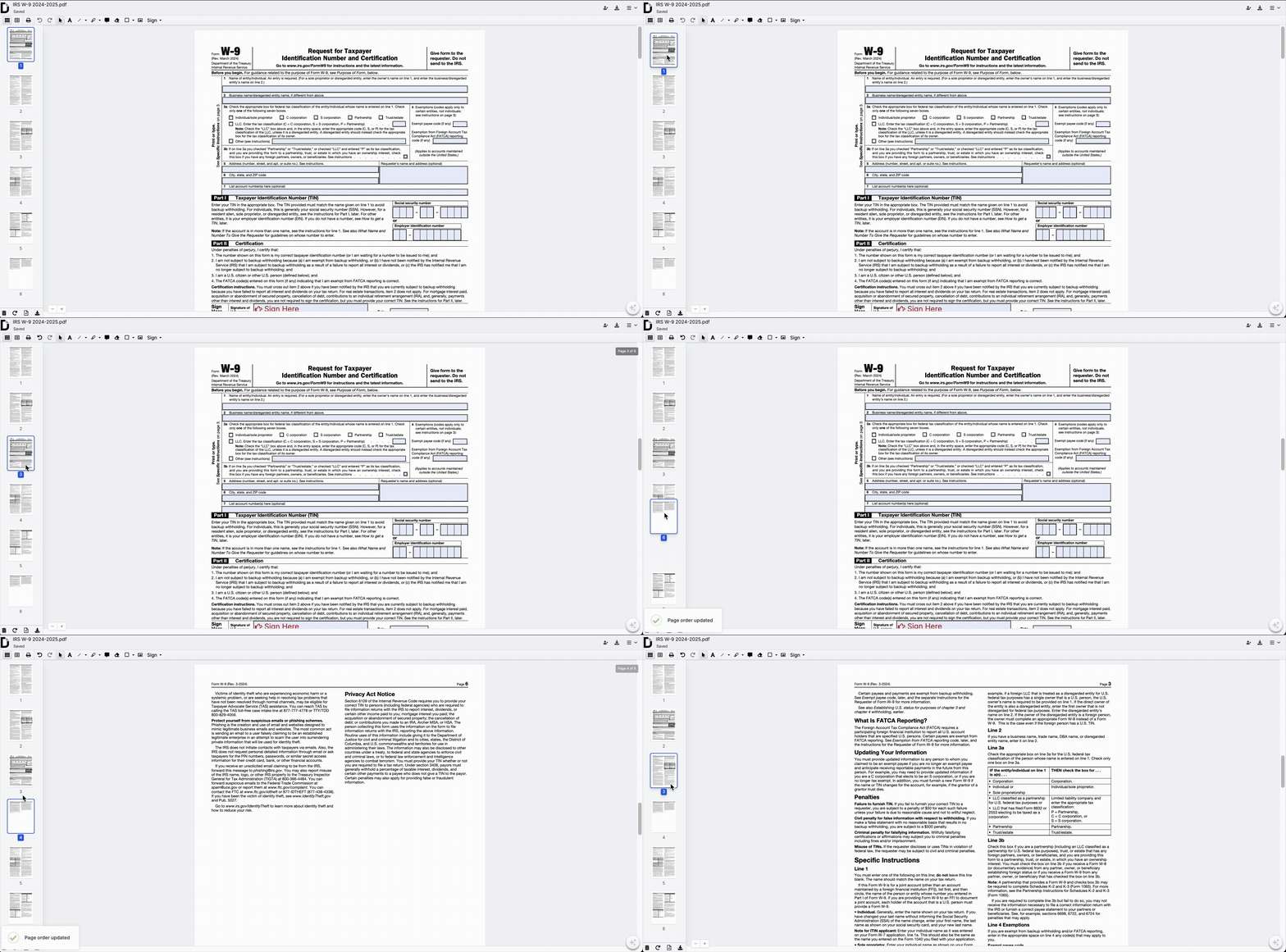
- Manage Pages: Go to the page manager to reorder pages or extract unnecessary ones.
4. Sign the document
Need a signature?
- Click the Sign in the toolbar.
- Create your eSignature (draw, type, or upload an image).
- Drag and drop your signature to the dedicated area in the document.
5. Export or download
When you are done, click the Download or Export button. You can send the file via email, generate a shareable link, or download it directly to your computer.
Final thoughts
Choosing between offline and online tools ultimately comes down to your needs. If you work in a high-security environment where most of your operations occur without internet, offline software is your friend. Meanwhile, online tools are often the preferred choice for small business owners, freelancers, and teams who value speed and collaboration.
Online PDF editing tools are popular because they are user-friendly, cost-effective, and accessible from anywhere.
In many cases, online tools let you boost productivity by eliminating the busywork of downloading, saving, and emailing files back and forth.
Ready to streamline your paperwork? Start using DocHub to edit, sign, and share PDFs faster.
Disclaimer: The information contained in this blog post is provided for general informational purposes only and does not constitute formal legal advice.
Glossary of key terms
- Cloud storage: A service that stores your files on remote servers (the internet) rather than your local hard drive.
- Digital signature: A secure way to sign documents online that verifies the signer’s identity.
- Annotation: Adding notes, comments, highlights, or drawings to a document for review purposes.
Frequently asked questions about PDF editing
Here are answers to common questions that arise when you start managing documents online.
Do I need to pay for a PDF editor?
Not always. Many online platforms, and DocHub among them, offer free plans that include basic editing, signing, and sharing features. However, advanced functionality, larger file limits, or workflow automation typically requires a paid subscription.
Can I convert Word documents to PDF online?
When using DocHub, the file conversion is automatically provided while you upload the file. It’s a seamless process that takes seconds and requires no additional action.
How do I combine multiple documents into one?
Most PDF editors include a merge or page management feature that allows you to combine multiple files into a single document. You can usually reorder pages before finalizing the merged file. This helps organize contracts, reports, or project materials into a single streamlined document.
Can I use DocHub on my phone?
DocHub offers mobile apps for Android and iOS. You can also access the platform through a mobile browser on smartphones and tablets. Review, edit, and sign documents without installing desktop software.
What if I need to work offline?
If you need to work without an internet connection, installing desktop software may be necessary. Online tools generally require an internet connection to access files and save changes. For occasional offline work, some platforms allow files to be downloaded and re-uploaded later.
- What are the fundamental differences in PDF editing software?
- What are the major benefits of online PDF editing?
- Comparison: offline vs. online PDF tools
- How does DocHub handle PDF editing?
- How to edit and sign with DocHub: 4 easy steps
- Final thoughts
- Glossary of key terms
- Frequently asked questions about PDF editing