


Online PDF editors are generally safe, provided you choose a reputable service with strong security measures. The key is to look for platforms that offer end-to-end encryption, comply with data protection regulations, and have a clear privacy policy stating your files are not stored indefinitely.
- Serious security risks online PDF tools can pose (especially free and unverified ones) include data breaches, unauthorized access, and malware.
- Key security features to look for include AES-256 encryption, SSL/TLS protocols, two-factor authentication, and automatic file deletion.
- Compliance with GDPR, SOC 2, and ISO/IEC 27001 is a strong signal that a platform takes data privacy seriously.
- You should avoid editing sensitive documents over public Wi-Fi, always verify a platform’s privacy policy, and use strong, unique passwords.
- DocHub keeps your files safe with end-to-end encryption and compliance with global data protection standards—making it a secure choice for everyone.
Compared to offline tools, online PDF editors have become incredibly convenient. They let you quickly edit, sign, and share documents right from your web browser, without downloading clunky software. Whether you’re finalizing a contract, filling out an application, or tweaking a report, these tools get the job done in just a few clicks.
But as you upload your files to these platforms, a critical question arises: are these tools truly secure for your sensitive data? When you’re handling private information like financial records or legal agreements, you need to know your files are protected.
This article provides a comprehensive guide to data security, explained for PDF editor tools, helping you understand the risks and how to mitigate them. Let’s walk through how to keep your documents safe, what to look for in a secure online PDF editor, and how DocHub meets these criteria.
Disclaimer: The information contained in this blog post is provided for general informational purposes only and does not constitute formal legal advice.
What are the main security risks of online PDF tools?
Before uploading sensitive documents, ask yourself: “How secure is the platform I’m using, and does it meet my data protection needs?”
Not all online PDF editors are created equal. Before you upload sensitive documents to any platform, it’s helpful to understand the specific vulnerabilities that could expose your data.

Data breaches during upload and download
The moment you upload or download a PDF file, it travels from your computer to a remote server and back again. If that connection isn’t properly secured, your data can be intercepted. This is a common risk on public Wi-Fi networks, where unauthorized parties can more easily monitor traffic.
Even well-known companies can suffer data leaks. In the past, massive data breaches have exposed the personal information of millions of users, simply because a server was misconfigured. When choosing an online tool, you need one that prioritizes securing this data transfer process from end to end.
File retention on remote servers
That’s one of the biggest questions about data privacy in online PDF editors. Some free tools store your uploaded files on their servers longer than necessary, sometimes indefinitely. This creates a tempting target for hackers. If the company’s servers are breached, every document stored on them—including yours—could be exposed.
A trustworthy service will have a clear data retention policy. Ideally, your files should be automatically deleted from their servers soon after you finish editing and download your document. This simple step reduces the risk that your files fall into the wrong hands.
Unauthorized third-party access
Some online services share your data with other companies for advertising or analytics. If their privacy policy is confusing or hard to find, you might agree to this without realizing it. Even if your data is anonymized, it can sometimes be combined with other information to identify you.
Worse, a weak platform could give its own employees unnecessary access to user files. A secure online PDF editor will have strict internal controls to ensure that only you—and the people you explicitly share it with—can access your document.
Malware from unverified tools
A quick search for “free PDF editor” will give you hundreds of results, but not all of them are safe. Some of these sites are designed to trick you into downloading malware disguised as a PDF editing tool. You could infect your device just by clicking a link or downloading a file. The risk is especially high on sites cluttered with aggressive pop-up ads or those that don’t offer clear information about the company behind the tool.
Privacy policy red flags to watch for
Before using any online PDF editor, review its privacy policy. Watch for vague language about “may share with partners,” no mention of data deletion timelines, absence of compliance certifications, and no clear contact information for data-related requests. These are signals that the platform may not prioritize your data security.
A real-world example: earlier, cybersecurity researchers found many free PDF converter tools that were secretly harvesting user data and sending it to third parties. Users had no idea their documents — some containing sensitive personal information — were being processed by external servers. This kind of incident highlights why the question “Are online PDF editors safe?” deserves a serious answer.
What security features should a safe PDF editor have?
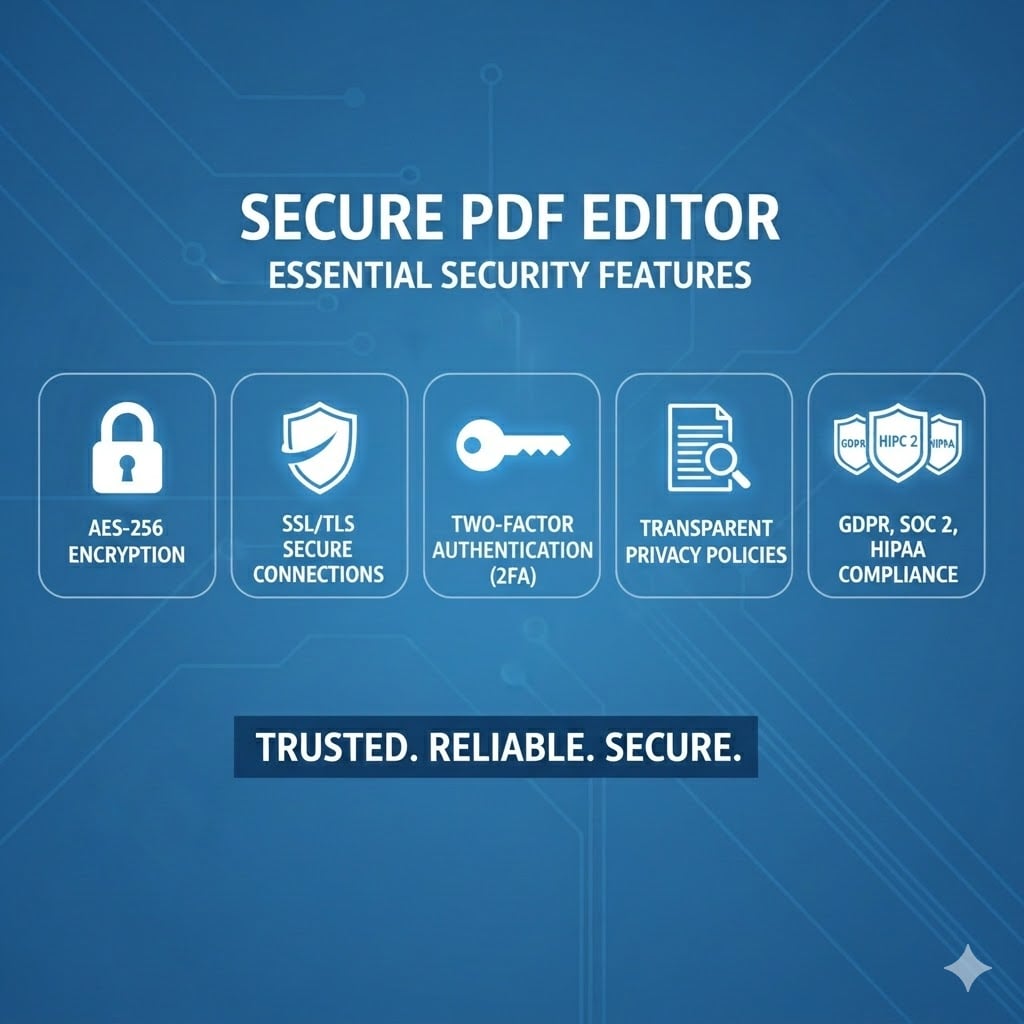
To keep your confidential information safe, you need to choose a PDF tool built with security at its core. Here are the non-negotiable features a secure PDF editor should offer.
Data encryption
Encryption is the process of scrambling your data so that it can’t be read by anyone without the right key. This is the foundation of data security. Look for these two types of encryption:
- SSL/TLS (Secure Sockets Layer/Transport Layer Security): This scrambles your data as it travels between your computer and the platform’s servers. You’ll know it’s active if you see “https://” at the start of the website’s URL.
- AES-256 (Advanced Encryption Standard): This is the gold standard for encrypting data at rest—meaning the files stored on the server. It’s the same level of encryption used by governments and banks to protect sensitive information.
Two-factor authentication (2FA)
A password alone is often not enough to protect your account. Two-factor authentication adds a second layer of security by requiring you to verify your identity with something only you have, like a code sent to your phone or the one generated by an authenticator app. With 2FA, it’s much harder for someone to access your account, even if they have your password. This feature is especially important for business accounts where multiple users may access shared documents.
Transparent privacy policies
A trustworthy platform will be upfront about its privacy practices. Look for a clear policy that explains what data is collected, how it’s used, and who can access it. Vague or confusing privacy terms can be a red flag.
Compliance with data regulations
Data protection laws set the rules for how companies must handle personal data. Compliance with these standards shows a company is serious about data security.
Standard | What it covers |
| GDPR (General Data Protection Regulation) | A European Union law that gives users significant control over their private data. |
| SOC 2 (System and Organization Controls 2) | A framework that audits how a company handles customer data based on five trust principles: security, availability, processing integrity, confidentiality, and privacy. |
ISO/IEC 27001 | International standard for Information Security Management Systems (ISMS), providing a framework to manage, secure, and protect an organization’s sensitive data. |
HIPAA (Health Insurance Portability and Accountability Act) | Protection of health-related information in the United States. Any tool that handles medical records in the U.S. must be HIPAA-compliant. |
As for HIPAA compliance, it’s more than a legal requirement—it’s an ethical one. Patients trust healthcare providers to keep their personal information safe, and using secure tools is crucial to upholding that trust.
To maintain HIPAA compliance, a PDF editor must adhere to strict guidelines that protect the security and privacy of patient information. Any PDF tool used in healthcare must include features like encryption, audit logs, and access controls to prevent unauthorized access to sensitive data.
What are the best practices for safe PDF editing?
Choosing the right tool is half the battle. The other half involves adopting smart habits to protect yourself when working with documents online.
- Use secure networks: Avoid editing sensitive documents on public Wi-Fi, like at a coffee shop or airport. If you must use it, connect through a VPN (Virtual Private Network) to encrypt your connection.
- Create strong passwords: Use a unique, complex password for every online service you use. A password manager can help you create and store them securely.
- Enable 2FA everywhere: Turn on two-factor authentication whenever it’s an option. It’s one of the most effective ways to secure your accounts.
- Read the privacy policy: Before you upload a document to an online PDF editor, take a minute to review the editor’s privacy and data retention policies. Make sure it explicitly states that your files will be deleted.
- Delete files when you’re done: If the service allows, manually delete your files from their servers after you finish editing and downloading them. Don’t leave sensitive data sitting in your account.
- Choose reputable tools: Stick with well-known, trusted online tools. Just because a free PDF editor ranks high in search results doesn’t mean it’s safe—some are designed to capture data or spread malware. A reputable tool with a clear business model and verifiable certifications is much safer than an anonymous free one.
How DocHub ensures your data privacy and security
DocHub is built with data security as a core priority. For professionals, businesses, and individuals who edit sensitive documents regularly, DocHub’s approach to data privacy offers concrete and verifiable protections. Here’s how our platform keeps your documents safe.
End-to-end encryption
We use the highest level of encryption to secure your files. All communication with our servers is protected with SSL/TLS encryption. Once your files are on our platform, they are secured with AES-256 encryption, ensuring your data is unreadable to unauthorized parties.
Global data protection standards
DocHub meets key global data protection standards. We’re SOC 2 Type II and PCI DSS certified and have completed Google’s third-party security assessment. This makes DocHub a secure choice for businesses in regulated industries that handle confidential information.
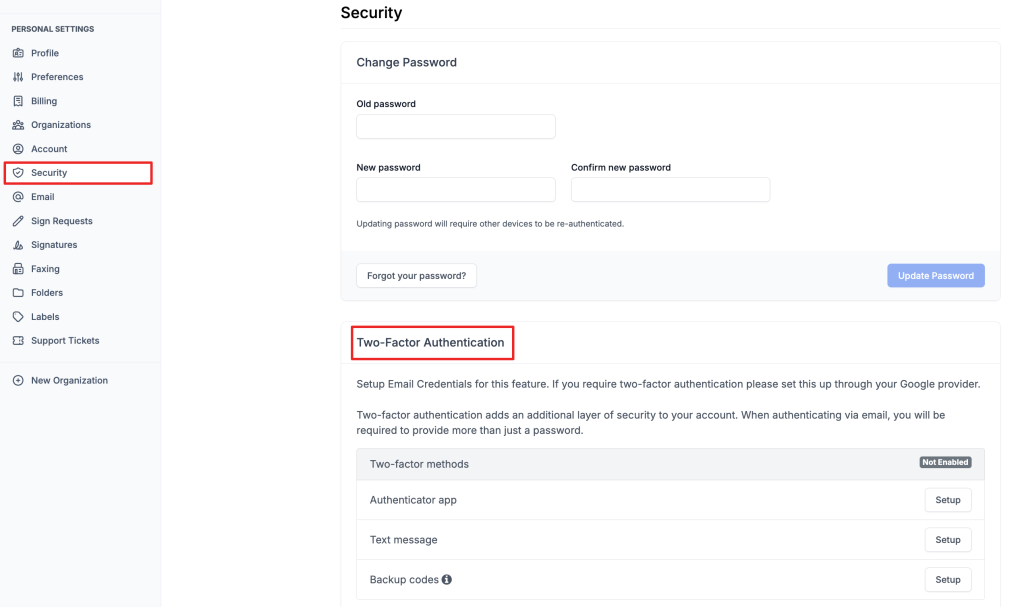
Two-factor authentication
Two-factor authentication (2FA) adds an extra layer of security to your DocHub account. Besides your password, you’ll need a second verification step to keep your account safe. DocHub supports 2FA through authenticator apps, backup codes, or text messages, so you can trust your sensitive information is protected from unauthorized access.
Strict data privacy
Your privacy is our priority. We’re compliant with leading data security standards like GDPR and HIPAA, so you can trust us with your most sensitive documents. We have a clear privacy policy that explains exactly how we manage your data, and we never sell your information to third parties.
No file retention policy
With DocHub, you are always in control. All your documents are private by default, so only you can view them when you’re logged into your DocHub account. Your files are only stored as long as you need them. You have the power to permanently delete your documents at any time.
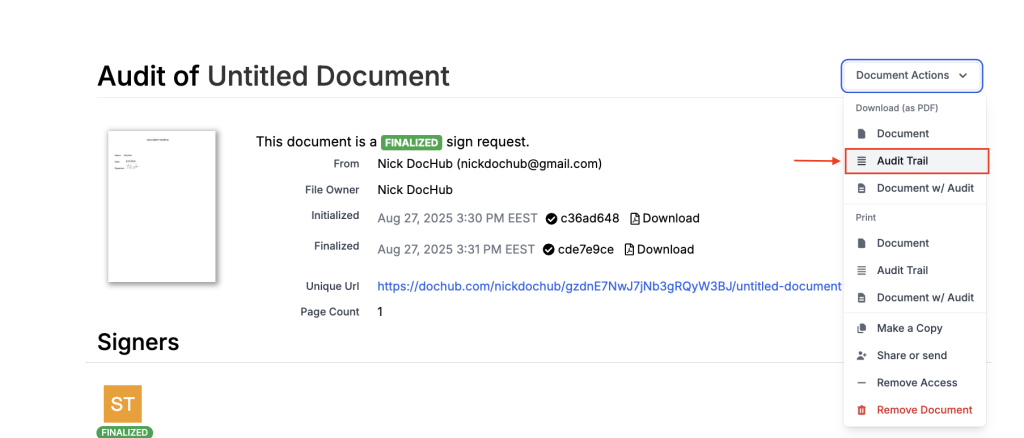
Audit trails
Sharing documents is a core part of getting work done. DocHub allows you to share and collaborate securely. Our Audit Trail feature provides a comprehensive history of all activity on a document, including who viewed, edited, or signed it and when. This creates a verifiable record for legal and compliance purposes, giving you full transparency and peace of mind.
Secure collaboration
Access control is an important factor when sharing sensitive documents. With DocHub, you can control who sees your documents and what they can do with them. When you share a file, you can set user permissions for each person, allowing them to view, edit, and download the document. Also, when sharing a document, you can set it as Private or Public depending on its sensitivity.
Final thoughts
Online PDF editors offer powerful features that can make your work easier and faster. While some free online tools come with security risks, you don’t have to give up on convenience to protect your information. By choosing a reputable platform with robust security features and following smart data practices, you can edit PDFs online with confidence.
DocHub was designed with exactly this balance in mind: powerful, easy-to-use PDF editing that does not ask you to trade convenience for security. Try DocHub today and experience secure, privacy-first PDF editing.
Glossary
- AES-256: A highly secure encryption standard used worldwide by governments and security-conscious businesses to protect data at rest.
- Data breach: An incident where confidential or sensitive information is accessed without authorization.
- End-to-end encryption: A security method that ensures data is encrypted on the sender’s device and can only be decrypted by the intended recipient, preventing anyone in between from reading it.
- Audit trail: A log of every action taken on a document, including who accessed it, what changed, and when. Audit trails help with compliance and tracking unauthorized activity.
FAQ
1. How secure is using a free online PDF editor?
Many free online PDF editors are safe, but it’s important to be cautious. Some may lack key security features, such as encryption, and their privacy policies may allow them to store or sell your data. To protect your information, always look for HTTPS in the URL, check the privacy policy, and avoid using free tools for sensitive documents.
2. How can I tell if a PDF editor is secure?
A secure PDF editor will openly advertise its security measures. Look for features like AES-256 encryption for stored files and SSL/TLS for data transfers. The platform should also be compliant with recognized data protection standards, like GDPR and SOC 2. A clear, transparent privacy policy and the option to enable two-factor authentication are also strong indicators of a trustworthy service.
3. What happens to my PDF file after I upload it to an online editor?
It depends on the platform’s data handling policy. Some tools automatically delete your files after your session ends, while others might store them for longer. Some platforms may even process your documents using third-party services. Always read the privacy policy before uploading a file, and look for platforms that automatically delete your files after you’re done.
4. Can I sign documents legally with an online PDF editor?
Yes, you can legally sign documents with the right online tool. To be valid, electronic signatures must comply with laws like the U.S. ESIGN Act and eIDAS in the EU. A platform must be able to verify the signer’s identity, show their intent to sign, and keep a secure audit trail of all document activity. DocHub meets these requirements, so you can sign and send documents for eSigning with confidence.
5. What does HIPAA compliance mean for a PDF editor?
HIPAA (the Health Insurance Portability and Accountability Act) sets the standard for protecting sensitive health information. For a PDF editor to be HIPAA-compliant, it needs specific safeguards to prevent unauthorized access to medical data. If you’re a healthcare provider, insurer, or any business that handles health records, using a compliant tool like DocHub is often a legal must. It also signals a higher security standard that’s good for everyone.