


When it comes to managing and editing PDF files, the choice between free and paid tools can be perplexing. Both options offer distinct features, but understanding the key differences is essential to selecting the right solution for your needs.
- Free PDF editors are great for simple tasks like merging, compressing, or making basic edits. But they often come with limits.
- Paid PDF tools give you more control and professional features, such as proper redaction, PDF/A export, and compliance tools (like SOC 2 or HIPAA) that regulated industries need.
- Free options often run online, meaning you’re limited by daily usage quotas, file size restrictions, and short file retention times.
- Paid tools remove most of the limits and often include desktop apps or offline options for more flexibility.
Introduction: Unlocking the power of PDF tools
PDF files are the standard for sharing documents in most modern workplaces. From contracts to financial reports, the Portable Document Format ensures your layout remains consistent across devices. But what happens when you need to edit a PDF? You face a critical decision: should you use a free PDF editor, or is it worth investing in a paid one? Many users wonder whether the differences between free and paid PDF editors justify the cost. Can a free version handle your daily tasks, or will you need advanced features?
While a free PDF editor might act like a “plain slice of bread”—functional but basic—a professional tool provides the “full sandwich” with all the trimmings. PDF editor apps vary significantly in their capabilities. Some merely allow you to view and annotate, while others offer full editing capabilities that transform static PDF documents into dynamic, editable files.
This guide explores the specific differences between these tools. We will help you decide when a free service is sufficient and when paying for PDF software becomes necessary for security, efficiency, and professional PDF editor features.
Core features of free PDF editors
Free PDF editors are typically web-based tools or lightweight desktop applications. They offer enough features for basic tasks without requiring any payment details. Let’s explore some of the common features included in free PDF software.
Viewing and basic annotation
Most free PDF software excels at being a robust PDF reader. You can open PDF files, zoom in, and read them clearly. Beyond simple viewing, the best free PDF editor options usually allow basic annotations. This means you can highlight text, add sticky notes, or draw simple shapes on the page. If you only need to review a draft and leave a few comments, a free online tool is often adequate.
Merging and splitting documents
A common task is combining several PDF documents into one or breaking a large file apart. Many online PDF tools allow merging multiple PDFs or splitting pages. For example, if you have three separate invoices that need to be sent as a single file, a free service can usually stitch them together. However, free features often come with limitations on the number of files you can process at once.
Simple text and image additions
Some free PDF editors allow you to add text boxes or insert images onto an existing page. This is useful for filling out a simple non-interactive form. However, true PDF editing—where you can modify the underlying text of a paragraph just like in a word processor—is rarely found in a free plan. Most free tools treat the original text as a locked image, allowing you only to layer new content on top.
Limitations you should expect
While useful, most free PDF editors come with significant strings attached. You might encounter:
- Watermarks: Your exported file may have a large logo stamped across it.
- File size limits: You may be unable to upload PDF files larger than 10MB or 20MB.
- Task limits: You might be restricted to two tasks per hour.
For a more detailed explanation, read our comprehensive blog post on how free online PDF editing works.
Advantages of paid PDF editors
When your workflow demands more than just viewing or simple annotation, paid PDF editing software becomes essential. Investing in a professional solution unlocks all the tools needed for comprehensive document management.
Advanced fallible forms creation
The greatest benefit of paid PDF software lies in its extensive features and advanced functionality, far surpassing what free options can provide. Among these is the ability to edit PDF documents online and create sophisticated fillable forms, ideal for gathering data or crafting interactive documents with ease and efficiency.
Built-in eSignature capabilities
With paid PDF editors, you can also add electronic signatures to your documents. This feature is especially useful for businesses that require signed contracts or agreements. Instead of printing and physically signing a document, users can simply add their signature digitally, saving time and resources. A signature in DocHub is unique to the signer, verifiable, and linked to the document in a way that detects subsequent changes, providing a level of trust that a simple “drawn” signature on a free tool cannot match.
Enhanced security and compliance
For businesses, security is non-negotiable. Paid PDF editor apps offer robust password protection and encryption standards (like 256-bit AES). Beyond basic locking, they enable digital signatures that are legally binding and verifiable. DocHub, for instance, provides electronic signatures that comply with major regulations like the ESIGN Act.
Workflow automation and integration
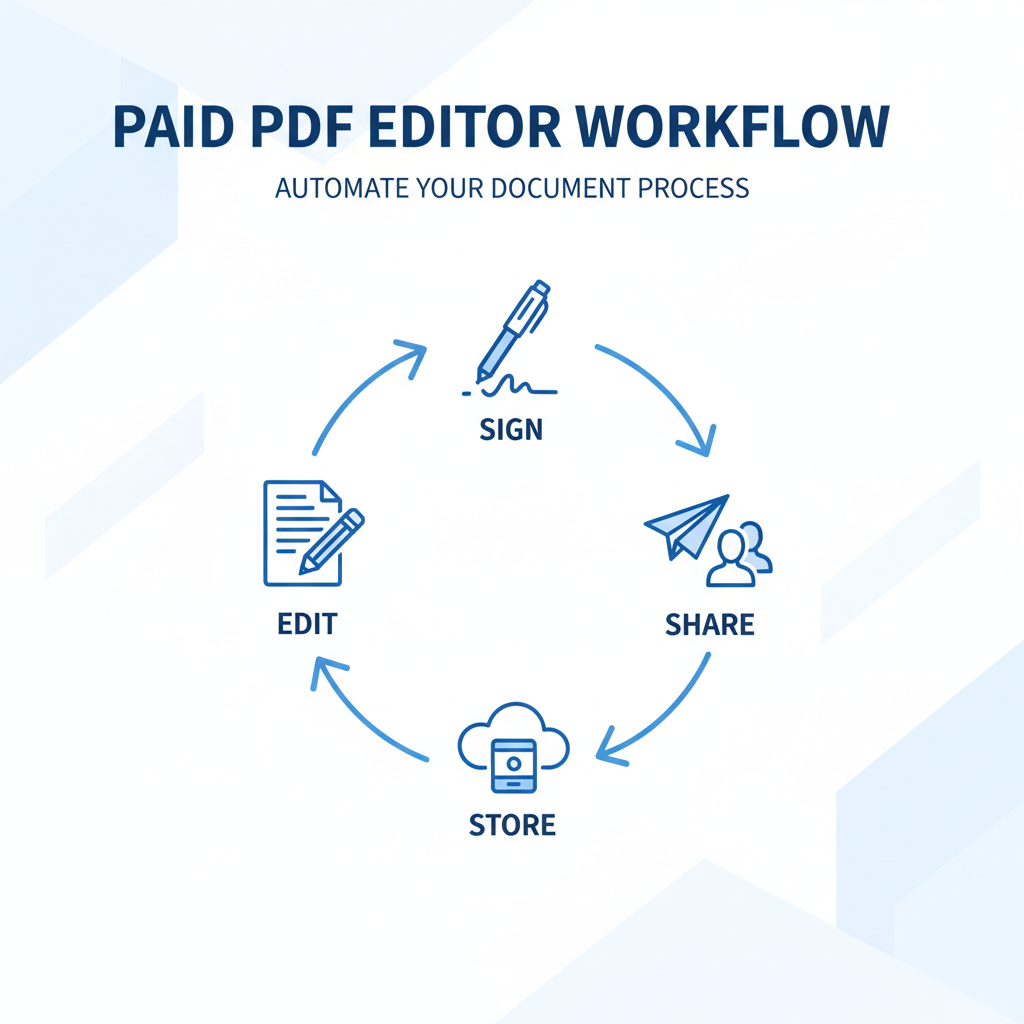
Paid solutions often integrate seamlessly with your existing tech stack. Whether you use Google Docs, Microsoft Word, or cloud storage, professional tools streamline the process. You can export PDFs, convert files, and manage multiple PDFs without leaving your primary workspace. Batch processing allows you to apply changes to hundreds of files simultaneously, saving hours of manual work.
When to choose free over paid (and vice versa)
Deciding between a free version and paid software depends entirely on your specific needs.
When a free PDF editor is sufficient
If you are a student or a casual user who rarely interacts with PDF files, a free PDF editor is likely enough.
- Occasional viewing: You only need a PDF reader to open files.
- Simple forms: You need to fill out a standard non-interactive form once a month.
- Quick conversions: You need to convert a Word document to PDF format occasionally.
- Basic merging: You need to combine two small files for personal use.
For these users, the best free PDF editor will handle the job without cost. However, be wary of online PDF editors that require you to upload sensitive personal data to unknown servers.
When you need a professional PDF editor
Professionals and businesses should almost always opt for paid PDF editing software or a comprehensive platform like DocHub.
- Frequent editing: You edit text inside PDFs daily.
- Legal security: You require valid electronic signatures and audit trails.
- Complex documents: You work with large files or PDF forms requiring logic and calculations.
- Team collaboration: You need multiple people to comment, sign, and edit the same PDF document securely.
Decision checklist:
- Do you need to edit text directly within the paragraph? (If yes: Paid)
- Are the documents confidential or legally binding? (If yes: Paid)
- Do you need to process multiple files? (If yes: Paid)
- Do you need legally-binding eSignatures? (If yes: Paid)
Hidden costs of free tools
While the price tag says zero, free PDF software often comes with hidden costs that can affect your productivity and security.
Watermarks and professionalism
Sending a contract to a client with a “Created with Free PDF Editor” watermark makes it look unprofessional. Many free PDF tools force this branding onto your documents unless you upgrade. Removing these watermarks often requires purchasing the software, negating the “free” benefit.
Data privacy risks
Many online service providers monetize their free tools by collecting user data. When you upload a PDF file to a free server for conversion, you lose control over that data. Using a free online PDF converter for sensitive financial or legal documents can pose a significant compliance risk. Secure platforms like DocHub prioritize data sovereignty and encryption, ensuring your digital documents remain private.
Usage limits and efficiency
“Free” often means “limited.” You might be midway through a project when you hit a daily limit on PDF editing. Waiting 24 hours to convert files or merge multiple PDFs kills momentum. Furthermore, the lack of batch processing means you waste time performing repetitive tasks manually—time that is ultimately more expensive than a monthly subscription.
Case studies: Real-world scenarios
To understand the real difference free paid PDF editors bring to the table, let’s look at two scenarios.
Scenario A: The student
Alex needs to submit a history essay. He wrote it in Microsoft Word and needs to turn it into a PDF format. He also needs to combine his essay with a cover page.
- Solution: Alex uses a free online tool. He uploads his Word documents, converts them, and merges the two files.
- Outcome: The free service works perfectly. The free features cover his needs, and security is not a major concern for a school essay.
Scenario B: The HR manager
Sarah sends employment contracts to five new hires. These PDF documents contain sensitive personal data. She needs to fill in salary details, ensure the contract is uneditable by the candidate (except for the signature field), and track when they sign.
- Free tool failure: A free editor might allow her to add text, but it won’t lock the file securely. She cannot track who opened it, and the eSignature might not be legally defensible.
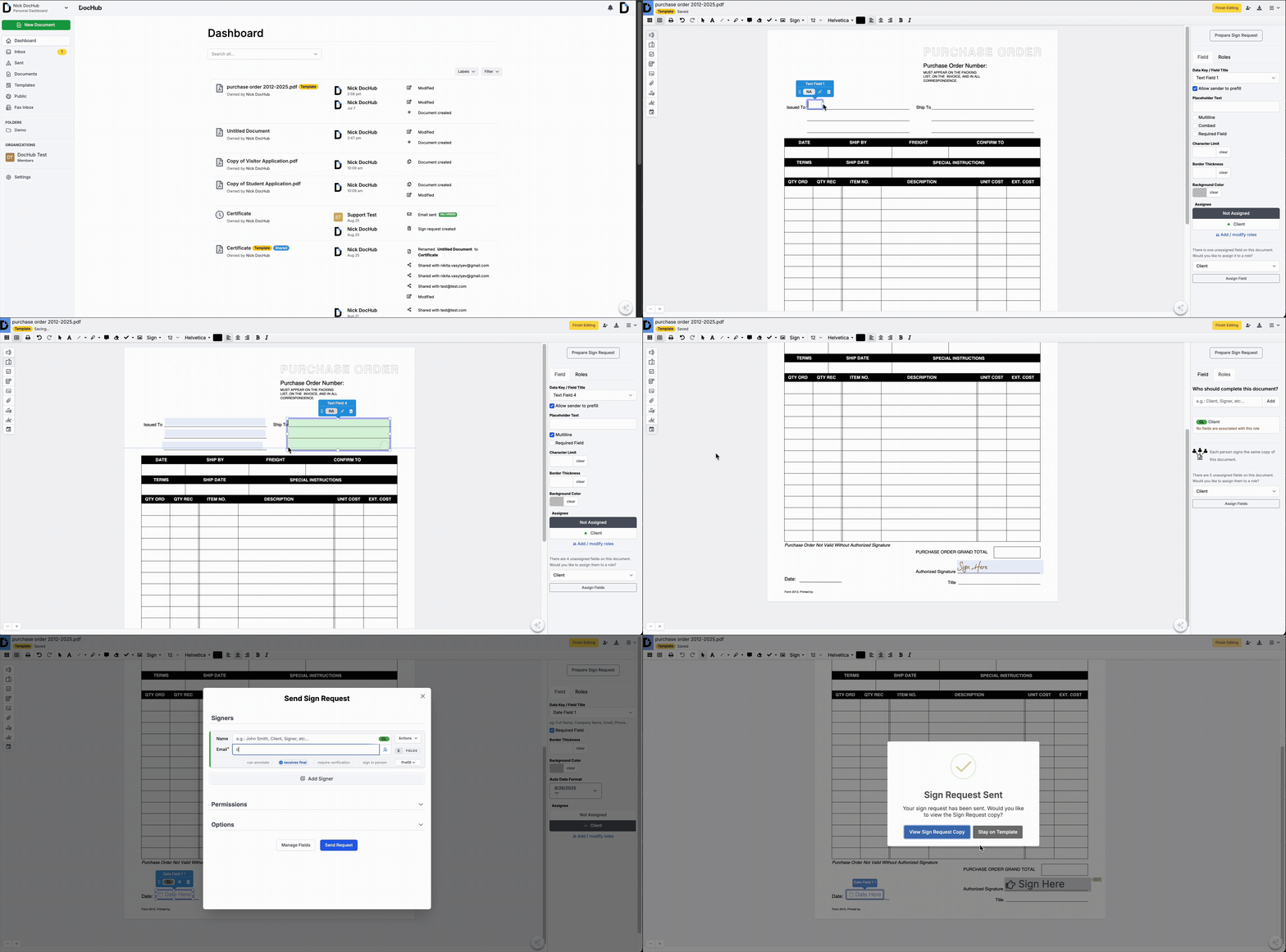
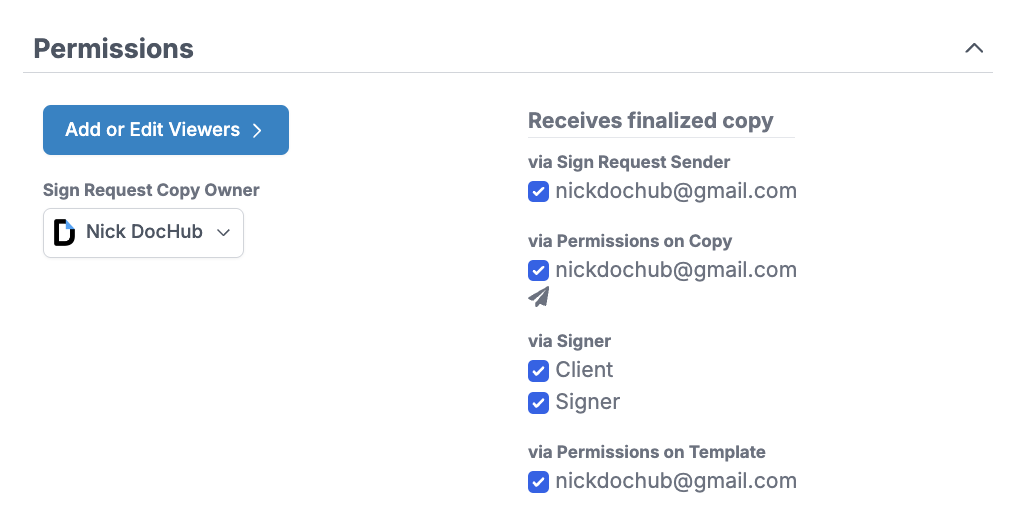
- Paid solution (DocHub): Sarah uses DocHub to create a template. From the platform, she can directly add and assign text boxes and smart fillable fields—including those for eSignatures—to specific users. She can also set sign request permissions and send invitations.
- Outcome: The process is secure, professional, and compliant. The value of paid PDF editing here is clear: it protects the company and saves Sarah hours of administrative work.
Why DocHub stands out
DocHub bridges the gap between basic online PDF editors and expensive, clunky desktop software. It offers robust editing capabilities, seamless Google Docs integration, and legally-binding signatures at an accessible price point. Unlike complex desktop versions that require heavy installation, DocHub operates entirely in the cloud, giving you advanced tools wherever you have internet access.
Final thoughts
The debate of free vs. paid PDF editors ultimately comes down to the value of your time and the security of your data. A free PDF editor can be a useful utility for quick, non-sensitive tasks. However, for anyone managing digital documents professionally, the limitations of free versions—from watermarks to security risks—often outweigh the savings.
Paid PDF editing software provides the advanced security, legally-binding eSignatures, and form creation capabilities required for modern business. By investing in a reliable tool like DocHub, you gain more than just an editor; you gain a secure platform for collaboration, signing, and document management.
Examine your current workflow. Are you constantly battling file size restrictions, concerned about data security, or losing valuable time to manual formatting? If so, it’s time to transition to a professional solution. Try DocHub today!
Disclaimer: The information contained in this blog post is provided for general informational purposes only and does not constitute formal legal advice.
Glossary
- Digital signature: A specific type of electronic signature that encrypts documents with digital codes that are difficult to duplicate, ensuring the authenticity of the signer and the integrity of the document.
- Cloud-based editor: PDF software that runs in a web browser, allowing users to edit PDFs online without installing large applications on their hard drive.
- Batch processing: The ability of a software program to process multiple PDF files automatically without user intervention for each individual file.
FAQ
1. Can I edit existing text in a PDF with a free editor?
Most free PDF editors only allow you to add new text over the top of the page. To actually modify or delete the original paragraph text, you typically need paid PDF software with advanced editing capabilities.
2. Are free online PDF editors safe for private documents?
It varies, but generally, you should be cautious. Many free online services do not offer the same level of encryption or privacy guarantees as paid platforms. For sensitive PDF files, a secure, paid solution is recommended.
3. What is the benefit of OCR in a PDF editor?
OCR (Optical Character Recognition) converts images of text (like scans) into actual selectable and searchable text. This allows you to edit PDFs that started as paper documents or flat images.
4. Do paid PDF editors work on mobile devices?
Yes, many professional solutions offer mobile support or responsive web interfaces. This allows you to edit documents and sign forms from your phone or tablet.
5. Is a digital signature the same as an electronic signature?
Not exactly. An electronic signature is a broad term for any signature applied electronically. A digital signature (like those supported by DocHub) uses encryption to verify the signer’s identity and to ensure the document hasn’t been altered, offering greater security.